Idea
Catch the spark before it slips away.
A writing desk for the whole journey
NovelDraft is your writing desk and a place to manage your novels, from the first idea to a finished book. Keep your notes close, your story in view, and your attention on the page.
A quieter place to write in privacy and safety. Your work stays yours.
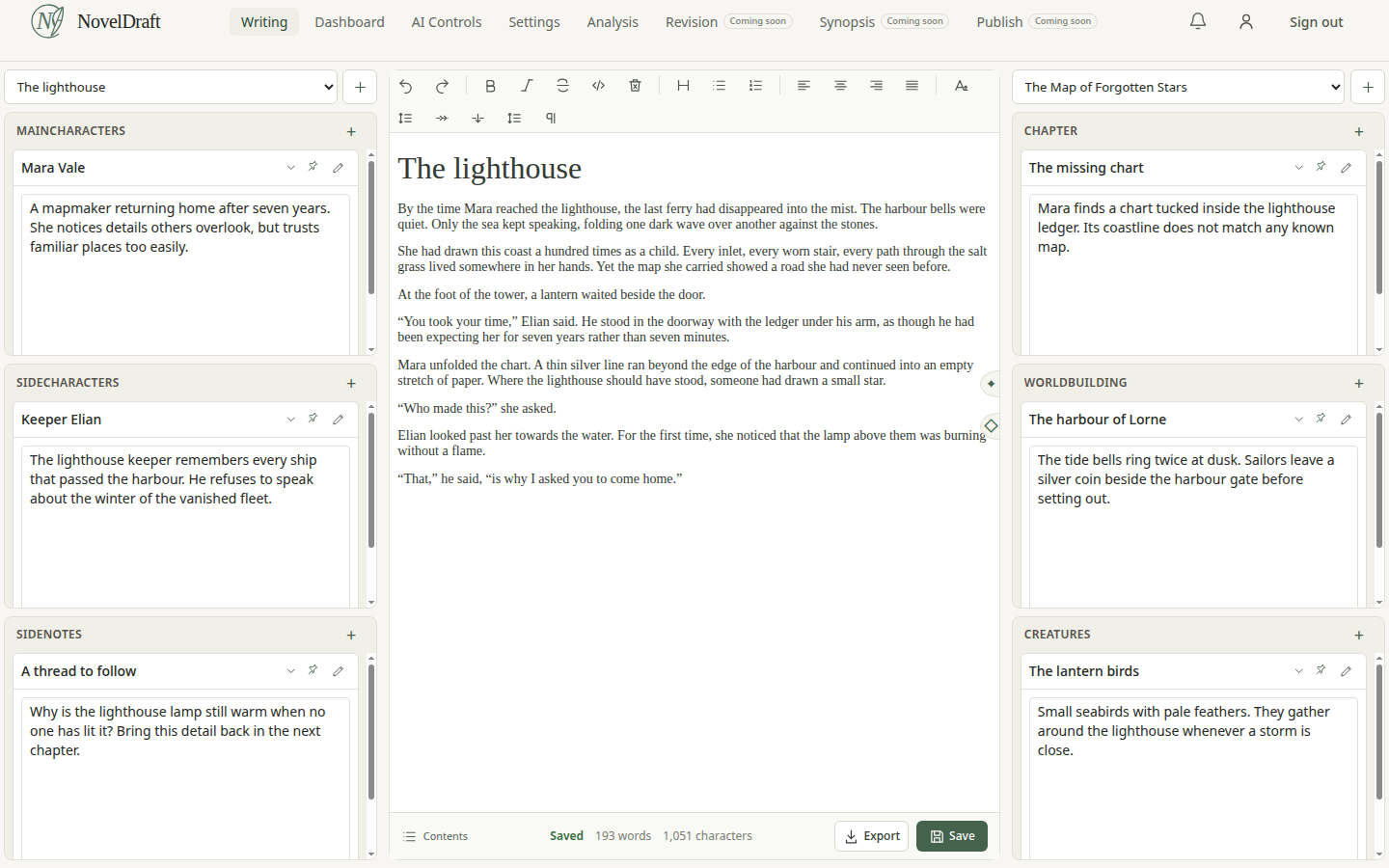
A writing desk made for complicated stories.
The long arc
A novel gathers more than words. NovelDraft keeps the pieces of your story together as it grows, so you can return to the work without starting from scratch.
Catch the spark before it slips away.
Keep characters, clues and questions nearby.
Stay with the scene in front of you.
See the story clearly as a whole.
Shape the draft for the next reader.
Bring the story you imagined into the world.
“The writer shouldn't have to remember their entire novel. The software should remember it for them.” — The idea behind NovelDraft
Inside the writing desk
Manage multiple novels on your digital writing desk. Each with its own manuscript, chapters and notes. Switch between stories without mixing their worlds.
Keep your manuscript, chapters and categorized notes together. Optional AI helps you find story details and check continuity; Analysis tracks your saved progress and writing goals.
Writing a novel in November? Set a November 50K goal and follow your saved word count, daily activity and writing streaks.
Make room for your storyExplore a temporary writing desk. No account needed.
What we believe
“I built NovelDraft because my story deserves the best — every important detail remembered, every idea ready at the tip of my pen.”
Protecting your writing is part of the product from the start.
Read our Privacy Policy for details about data handling and Google Drive and Dropbox permissions.
Own your writing desk
A permanent writing desk for your novels. No monthly subscription.
€20 — once
Lifetime license. Applicable tax added at checkout.
Try NovelDraft free for 15 days. No card required.
Bonus: First 20 writers get NovelDraft free licenseAI is optional and off by default. Local Ollama needs no cloud API key; Personal ChatGPT AI uses your account through Codex, with your account’s limits. Future services that use external processing may have separate costs, explained before you choose to use them.
* No refunds after the free trial, except where required by law or under Paddle's refund policy.
A quick guide
The editor toolbar is there when you need it. Here’s what its controls do.
Use Bold, Italic, Strikethrough and Code to change selected text. The reset control clears inline formatting. The heading menu applies one of five heading levels to the current paragraph.
Choose a bulleted or numbered list to organize items. The alignment controls set a paragraph left, center, right or justified. These controls affect the current selection or paragraph.
Undo reverses your most recent editor change. Redo restores a change you just undid.
Scene break inserts a centered separator. Name scene adds a separator you can name and find in the contents menu. Insert empty page adds blank writing space. Font size and line spacing adjust your reading view.
Export your current manuscript as a Word document from the editor footer. On the Dashboard, select individual notes or all notes and export them in one Word document, grouped by category with linked contents.
Without connected storage, save one novel of up to 1000 words in NovelDraft. Connect Google Drive or Dropbox to save larger manuscripts, create more novels and use chapters. The editor shows saved, saving and unsaved states. Notes are stored in NovelDraft and save when you leave a changed note; you can also use its Save button. After connecting cloud storage, open Writing to transfer your starter draft.
The Try it editor is a temporary demo. Its changes disappear when you reload or leave the page. Create an account to use the full writing desk.
You remain the author. Optional AI can help you find story details, check continuity, brainstorm and revise. You choose the connection and controls; proposed writing is applied only with your approval.
Choose a connection to see its setup instructions.
Released and planned
The writing desk is released, with story organization, optional AI assistance and writing analysis. Development continues; upcoming features and their order may change.
Your story is ready when you are
Open your desk. Start with the next sentence.
Start your draft